
Schematron
Schematron files (.sch) are checked as you edit them, with auto-completion and
formatting. They're checked as SchXslt2 runs them:
SchXslt2 1.11.3 - the ISO Schematron processor XSpec uses, as a patch update to XSpec's own copy - which compiles a schema to an XSLT 3.0
stylesheet - see Testing a Schematron.
About legacy Schematron versions
A schema is checked as ISO Schematron 2025 with an XSLT query binding, e.g.
queryBinding="xslt3" - with queryBinding="xslt4", its XPath is checked as XPath
4.0. A schema in the namespace of Schematron 1.5 is reported, as SchXslt2 doesn't validate with
it - with a quick fix, Convert to ISO Schematron, that changes the namespace, a
pattern's name to its title, and sch:key to
xsl:key. A pattern in ISO Schematron's namespace with Schematron 1.5's name -
e.g. once the namespace is changed by hand - has quick fixes that replace it with a title, for the pattern
or each one.
Validating an XML file
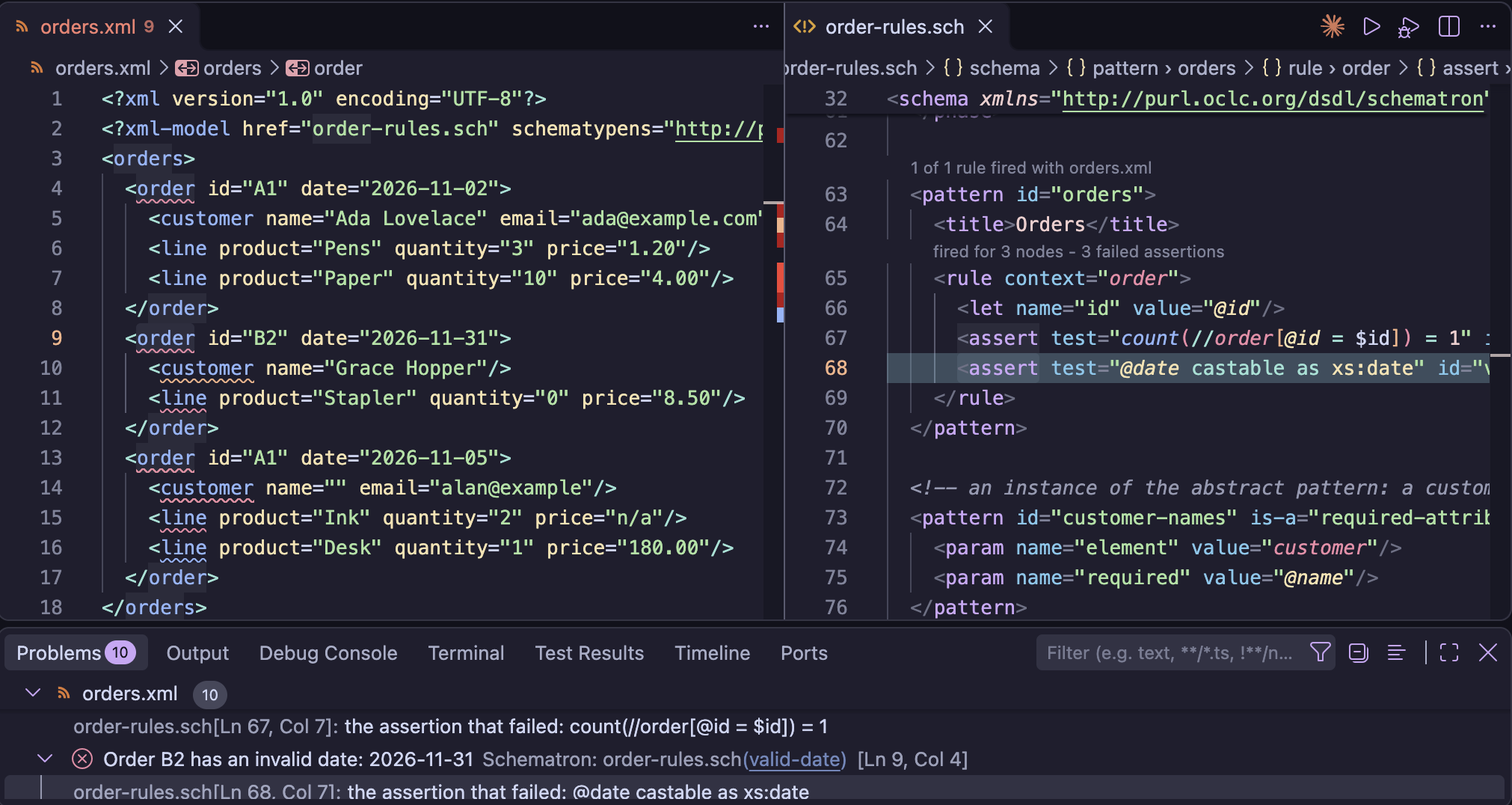
With an XML file in the editor, run Schematron: Validate from the Command
Palette - or Validate with Schematron from the More Actions
(...) menu in the editor's title bar. The
file is validated as SchXslt2 validates it, with the Saxon of the XSLT.tasks.saxonJar
setting - any edition - and each failed assertion and successful report is shown in the
Problems view, at the element or attribute it's about, with its message and diagnostics.
Its severity is the assertion's severity or role - e.g. warning
or info - and otherwise an error. To go to the assertion in the schema that reported a problem,
click its id - or assert or report - in the problem's hover or the
Problems view, use the Show the assertion quick fix
(⌘.), or the link below the problem in the Problems
view.
The schema is the one an xml-model processing instruction in the file associates with it,
e.g. <?xml-model href="rules.sch"
schematypens="http://purl.oclc.org/dsdl/schematron"?> - otherwise the one last used for the
file, or one you choose from the workspace's. Schematron: Validate (Choose
Schema)... chooses again.
A schema has an XML context file, as a stylesheet does: the XML file you develop it
for. It's shown in the status bar for a Schematron file - click it to choose one, or run
Schematron: Choose XML Context File...: the files whose xml-model names the
schema are listed first. Until you choose one, it's inferred: the file last validated with the schema,
else an open file whose xml-model names it. Validating another file with the schema, from
its own editor, doesn't change one you've chosen. A file that sch:include brings in has the
context file of the schema that includes it.
A file that more than one schema includes belongs to the one in the nearest folder - unless you choose another with Schematron: Choose Including Schema..., or the button in the title of the Schematron Includes view. The schema chosen is then used for the files it includes, as a chosen top-level stylesheet is for its modules. It gives the file's XML context file, and what's in scope where it's included - for checking it, and for navigation. XSLT: Reset Top-Level Stylesheet Choices clears these choices too.
With a Schematron file in the editor, Quick Run - the ▶ button in the editor's title bar, or Schematron: Quick Run: Validate the XML Context File - validates the context file with the schema, and so does Schematron: Validate. The problems are shown for the XML file, and above the schema's rules, while the schema stays in the editor: edit a rule, run, and see what it reports.
In the schema, the validation is shown above each rule: the nodes it fired for, with its failed assertions
and reports - the nodes it was suppressed for, as an earlier rule of its pattern matched them first - or
that it never fired, which usually means its context isn't what was meant.
Above each pattern is how many of its rules fired, or that it wasn't active in the phase. Click one to open
the XML file.
Once a file is validated, it's validated again each time it, or the schema, is saved - so you can edit the schema's rules and see what they report. Saxon's messages, e.g. for an error in the schema, are in the Schematron output channel.
The result of the last validation is shown in the status bar while the XML file - or the schema, for its context file - is in the editor: ✓ rules.sch when the file is valid, or the number of problems, e.g. ⊗ 3 · rules.sch - with an error icon when any is an error, else a warning or info icon - and the time it was validated in the hover. Click it to validate again - or, with problems, to show them in the Problems view. When the file, the schema or a file the schema includes is edited after the validation, the icon is an empty circle until it's validated again, as the result may be out of date. A validation at the end of a debug session is shown too.
The schema's default phase is used - its defaultPhase, or all its patterns without one.
The phase is shown in the status bar for a Schematron file - and for an XML file with a schema - e.g.
phase: books (default): click it, or run Schematron: Choose Phase..., to
choose another: one of the schema's phases, with its title, or #ALL for all its patterns. The
phase is kept for the XML file and the schema, and Quick Run, Validate and Debug all use it - a file already
validated is validated again with it. It's shown with the result, and above a pattern that wasn't active
in it.
Debugging a schema
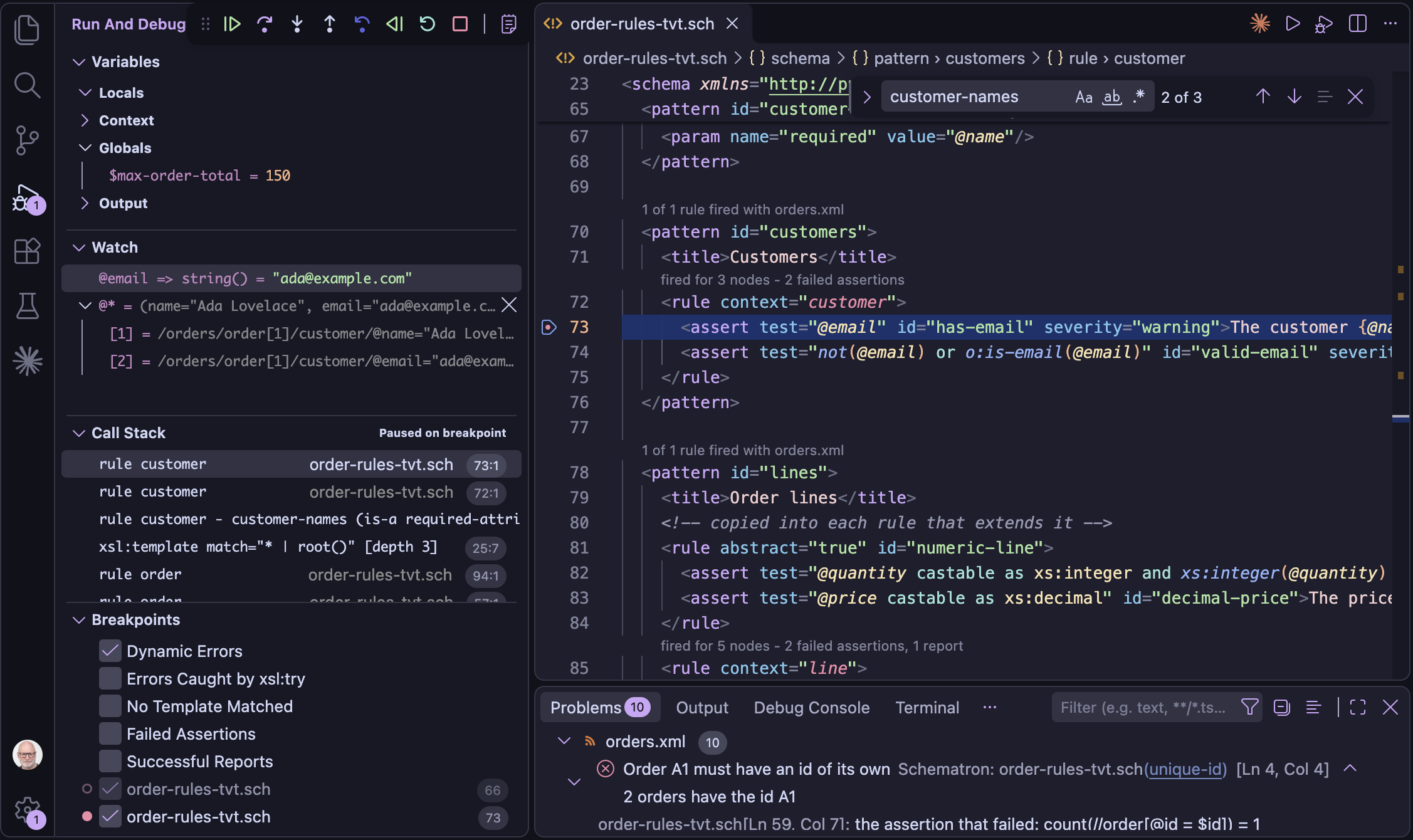
With a Schematron file in the editor, the debug button in the editor's title bar - or Schematron: Debug: the XML Context File - validates the schema's XML context file in the XSLT debugger, with the schema's phase. SchXslt2 compiles the schema to a stylesheet, which the debugger runs - but breakpoints, pauses and stepping are at the schema's own lines, so you don't see the compiled stylesheet.
- Breakpoints - set them on a rule, a rule's
let, anassertorreport, or avalue-ofin a message, in the schema or a file it includes. On a rule, it pauses each time the rule fires, with the node it fired for as the context item - on a pattern, at each of its rules. A breakpoint where there's nothing to pause at is moved when you add it, keeping its condition, to the step it's in - e.g. from a line of an assertion's message to the assertion, or from a pattern'sparam, which SchXslt2 replaces with its value, to the pattern - or removed if there's none, e.g. on the schema's title, or a globallet, whose value is in Globals. The status bar says which. A breakpoint in a pattern that isn't active in the phase isn't verified, and says so. Conditions and logpoints work as in a stylesheet, e.g. a condition@id = 'B2'. - Failed assertions - check Failed Assertions, or
Successful Reports, in the Breakpoints view to pause at each one, on
the node it's for, with its message shown at the assertion - without a breakpoint on each. To pause
only for some, edit its condition (the pencil button) to the roles or severities to pause for, e.g.
error fatal: one with neither is an error, as in the Problems view. For one node, use a conditional breakpoint on the assertion. - Stepping goes from one of the schema's steps to the next - a rule, its lets, then its assertions and reports - not through SchXslt2's own code.
- Variables are the schema's: the rule's
lets, and the schema's and pattern's in Globals - SchXslt2's own variables are hidden. In the rule of an abstract pattern, the call stack names the pattern that uses it - e.g. rule order - order-dates (is-a required) - and itsparamvalues are in a Parameters scope. In Watch, the Debug Console and a hover, a parameter, e.g.$required, is replaced by its value, as SchXslt2 replaces it in the pattern's copy. A breakpoint in an abstract pattern pauses in each pattern that uses it - one on the line of a pattern withis-apauses in that one alone. - Watch and the Debug Console evaluate XPath with the rule's node as the context item - e.g. to try out a test before you change it - and hovering a variable shows its value.
- Empty steps - while paused in a rule, the
first step in a path of its lets, tests and messages after which the path is empty is faded, with why
in its hover - e.g.
lineintest="line", for anorderthat has no lines. Not the rule'scontext. In an abstract pattern's rule, a path that starts with a parameter is checked with the parameter's value - and the parameter alone too, as its value is often a path, e.g.@name.
When the session ends, its result is shown as a validation's: in the Problems view and above the schema's rules. And in the XML file, hovering over an element's start tag shows the rules that fired for it, and its attributes and text, with a link to each - Go to Definition (F12) goes to them - see From the input to the templates.
Profiling a schema
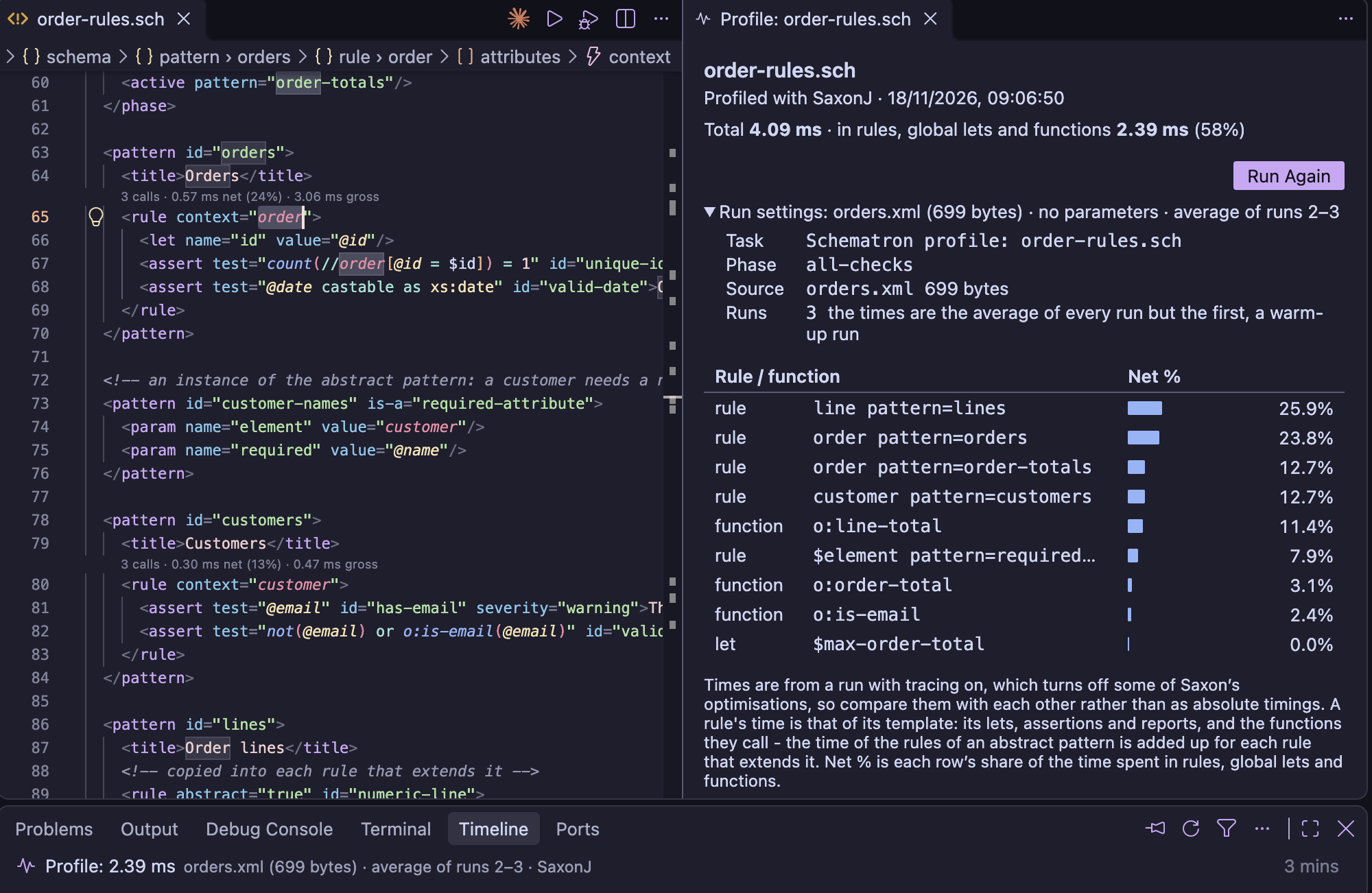
To find which rules take the time, run Schematron: Profile: the XML Context File - from the Command Palette, or the More Actions (...) menu in the editor's title bar. The schema runs as it does for debugging - SchXslt2 compiles it, with its phase, and Saxon runs the result on the schema's XML context file, timing each template, function and global variable - and the times are shown in the Profile view, as for a stylesheet.
- Rows - each rule, with its pattern, the number of times it fired, and its net and
gross time - and each global
sch:letandsch:param. The rules of an abstract pattern are added up over each rule that extends it. A click goes to the rule in the schema, or the file it's in. - Functions of the XSLT modules the schema uses, e.g. with
xsl:include, are rows as in a stylesheet's profile. SchXslt2's own templates and functions are left out. - In the editor - while the view is open, each rule and global
letshows its times above it in the schema, and in the files it includes. - Timeline - each profile is kept in the schema's Timeline view, to show again and compare, as for a stylesheet.
A rule's time is that of its template: its lets, assertions and reports, and what they call.
Saxon times templates, functions and globals, not each instruction, so there's a time for a rule but not
for an assertion in it - to find a slow assertion, try removing or simplifying one at a time, or step
through the rule in the debugger. The times are from a run with tracing on:
compare them with each other. It needs Saxon-PE or Saxon-EE, and
uses the same XSLT.tasks.profileRuns setting for warm-up
runs.
Editing
Auto-completion offers the elements, attributes and values ISO Schematron 2025 allows where you are -
e.g. sch:group, sch:param, an assertion's severity, and a phase's
from and when - with a description of each element. It works whatever prefix
the schema uses for Schematron - sch, another, or none, with the Schematron namespace as the
default. In a new file, it offers a schema with a pattern.
An element is inserted with the attributes it requires, in each form it's commonly written - e.g.
sch:rule with context, sch:rule (abstract) with
abstract="true" and id, sch:assert with test and its
message, and sch:let with name and value, or its content - as are
the XSLT declarations SchXslt2 copies, e.g. xsl:function with name and
as.
In XPath, auto-completion offers the variables in scope - the schema's, the pattern's and the rule's - and element and attribute names from the schema's XML context file.
XPath expressions are highlighted and checked in context, test,
subject, select, path, value,
visit-each, documents, and a phase's from and when.
role, flag and severity are attribute value templates, e.g.
role="{$level}", as SchXslt2 copies them into its report.
Navigation
- Ids - in a reference -
is-a,extends'srule, a phase'sactive,defaultPhase, and an assertion'sdiagnosticsandproperties- auto-completion offers the ids it can refer to, e.g. the abstract rules forextends, and in a pattern withis-a, a parameter'snameoffers the abstract pattern's parameters. Go to Definition, Find All References and Rename work on an id, in the schema and the files it includes - Variables - Go to Definition, Find All References and Rename on a variable reference
or an
sch:letorsch:param, with the variable's scope as SchXslt2 has it - and for an abstract pattern's parameter, thesch:paramof each pattern withis-afor it. Across files, as SchXslt2 assembles them: a variable used in a file thatsch:includebrings in, but declared in the schema, goes to the schema's declaration - with its hover - and a declaration's references and Rename include those in the files the schema includes in its scope, unless a file declares the name itself - Schematron Includes - for a Schematron file, the Imports view in the Explorer -
XSLT Imports for a stylesheet - shows the schema that includes it, found from the
workspace's
.schfiles, with the files the schema brings in: withsch:include,sch:extends'shref, andxsl:includeandxsl:import- each XSLT module with its own imports and includes - expanded down to the file in the editor. Click a file to open it. A file thatsch:includebrings in, e.g. one whose outermost element is a pattern, is checked with what's in scope where it's included: the schema'ssch:nsprefixes, the variables of the schema, its phases and the elements containing thesch:include, and the XSLT functions the schema declares or includes - and for the XSLT SchXslt2 ignores, as a schema is. A schema's variable used only in a file it includes isn't reported as unused - Functions - Go to Definition, Find All References and Rename for a call of an XSLT
function: declared with
xsl:functionin the schema, or in a module itsxsl:includeorxsl:importbrings in - also from a file the schema includes. From the declaration in a stylesheet, its references and Rename include the calls in the Schematron files that use its module - Outline - each element by what identifies it: a pattern by its id, a rule by its context, an assertion or report by its id, else its test
Hover help
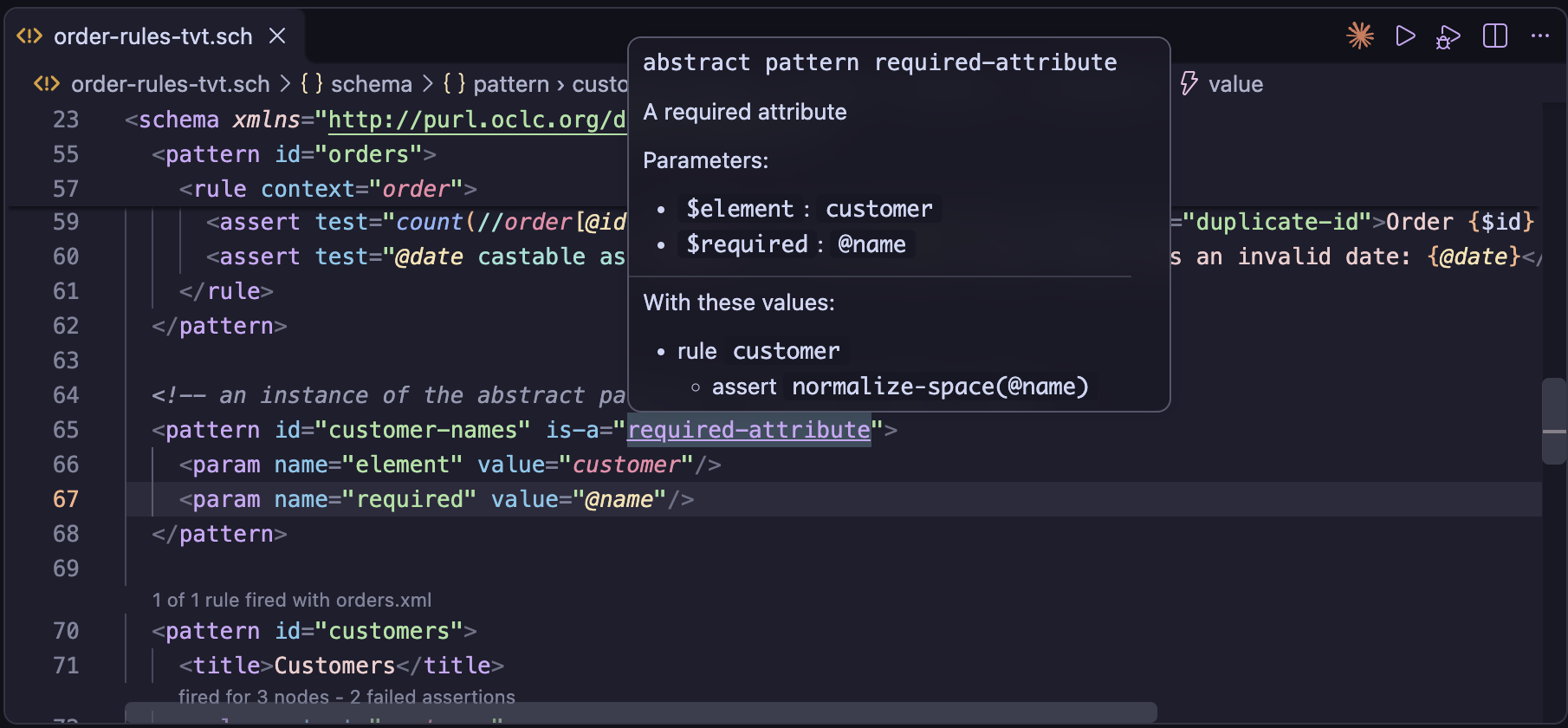
Hover help is for reviewing a schema as much as for editing it:
- A pattern's
is-a- the abstract pattern's title, its parameters with the values this pattern gives - or their defaults - and its rules and their tests with those values in place, as SchXslt2 instantiates them extends- the abstract rule's variables and tests, as they're copied into the rule- A rule - its context, variables and assertions, and the earlier rules of its pattern: a node is handled only by the first rule whose context matches it, so a rule that comes after a rule that matches the same nodes is never used
- An assertion or report - when it's reported, its severity, role and flag, its message, and the text of its diagnostics
- A variable - its
sch:letorsch:param, with its value and where it's declared - or in an abstract pattern, its parameter and the value each pattern gives it - A phase's
active, and an assertion'sdiagnosticsandproperties- the pattern's title and rules, and the diagnostic's or property's text - Functions - as in a stylesheet: the signature of a built-in function, and of a function declared in the schema or a module it includes, with its documentation
Checks
The problems are shown in the Problems view, as for a stylesheet:
- Variables -
sch:letandsch:paramare in scope as SchXslt2 declares them: the schema's and a phase's are global, a pattern's are in scope in its rules, and a rule's in its assertions and reports - Namespace prefixes - SchXslt2 declares only the prefixes of
sch:nsin its stylesheet, so a prefix declared only withxmlns- or not at all - is reported, e.g.xsinxs:integer(@n), with a quick fix that adds thesch:ns. Within an XSLT element, e.g.xsl:function, itsxmlnsdeclarations apply too - Abstract patterns and rules - an abstract pattern's parameters aren't variables,
so they aren't reported, and an abstract rule and the rules that extend it share their
sch:let, as SchXslt2 copies its content into each of them - References - as SchXslt2 resolves them, with the files
sch:includebrings in: an error where it stops -is-athat isn't the id of an abstract pattern (or group), or doesn't supply a parameter the abstract pattern declares with no value, andextendswhoseruleisn't the id of an abstract rule - and a warning where it ignores the reference: a phase'sactivefor a pattern that isn't declared, or is abstract,diagnosticsorpropertiesthat aren't declared, and ids that aren't unique. Go to Definition on a reference goes to its declaration, also in an included file - Files - the
hrefofsch:include,sch:extends,xsl:includeandxsl:importis a link to the file - and a file that isn't found is reported, as SchXslt2 stops - Rules that never fire - a node is handled only by the first rule of a pattern whose
context matches it, so a rule with the same context as an earlier one, or one for elements after a
rule for every element, e.g.
context="*", is reported - not in a group, where every matching rule is used - Required attributes - an element without an attribute ISO Schematron requires is
reported, with a quick fix that adds it: an error where SchXslt2 fails without it, e.g. a rule's
context, an assertion'stestorsch:ns'suri, and a warning where it carries on, but the element can't be referred to or does nothing, e.g. a phase with noid - Elements and attributes - those that ISO Schematron doesn't allow where they are.
Elements in other namespaces, e.g. Schematron QuickFix's
sqf:fix, aren't checked against Schematron's schema, and a file thatsch:includeincludes may start with any Schematron element, e.g.sch:pattern
XSLT in a schema
An xsl:function, xsl:key or xsl:accumulator in the schema is
checked as in a stylesheet, and its functions can be called in the schema's XPath. So can the
functions of the modules that xsl:include and xsl:import bring in.
SchXslt2 copies only these XSLT declarations of a schema into its stylesheet:
xsl:accumulator, xsl:function, xsl:include,
xsl:import, xsl:import-schema, xsl:key and
xsl:use-package. Other XSLT isn't used as written, so it's reported:
| In the schema | With SchXslt2 | Quick fix |
|---|---|---|
another XSLT declaration, e.g. xsl:param, xsl:variable or
xsl:template | ignored | sch:param, or
sch:let |
XSLT in a rule, e.g. xsl:variable | ignored | sch:let |
XSLT in a message, e.g. xsl:value-of in sch:assert | not run - copied into the report as it is | sch:value-of |
XSLT in the content of sch:let | not run - copied into the value | |
an XSLT attribute of a Schematron element, e.g. xsl:use-when - or
xsl:expand-text, unless it's allowed |
ignored | remove it |
An xsl:note in a declaration SchXslt2 copies, e.g. xsl:function, is copied
with it, and its stylesheet is XSLT 3.0: Saxon runs it only with its syntax extensions, which XSpec turns on
for the tests of the schema - with the default XSLT.xspec.allowSyntaxExtensions setting,
auto - as it does for queryBinding="xslt4". A note is reported when the Saxon of
the XSLT.tasks.saxonJar setting can't run it - Saxon-HE, or a Saxon before 13 - or the setting
is off, with a quick fix that adds use-when="false()", with which Saxon leaves
the note out.
SchXslt2 also declares the unnamed mode, with the schema's own accumulators. An included or imported
module that declares the unnamed mode with use-accumulators is reported, as Saxon reports
XTSE0545 for the two, and so is one that declares accumulators, as SchXslt2's modes don't use
them: declare them in the schema instead.
Text value templates in messages
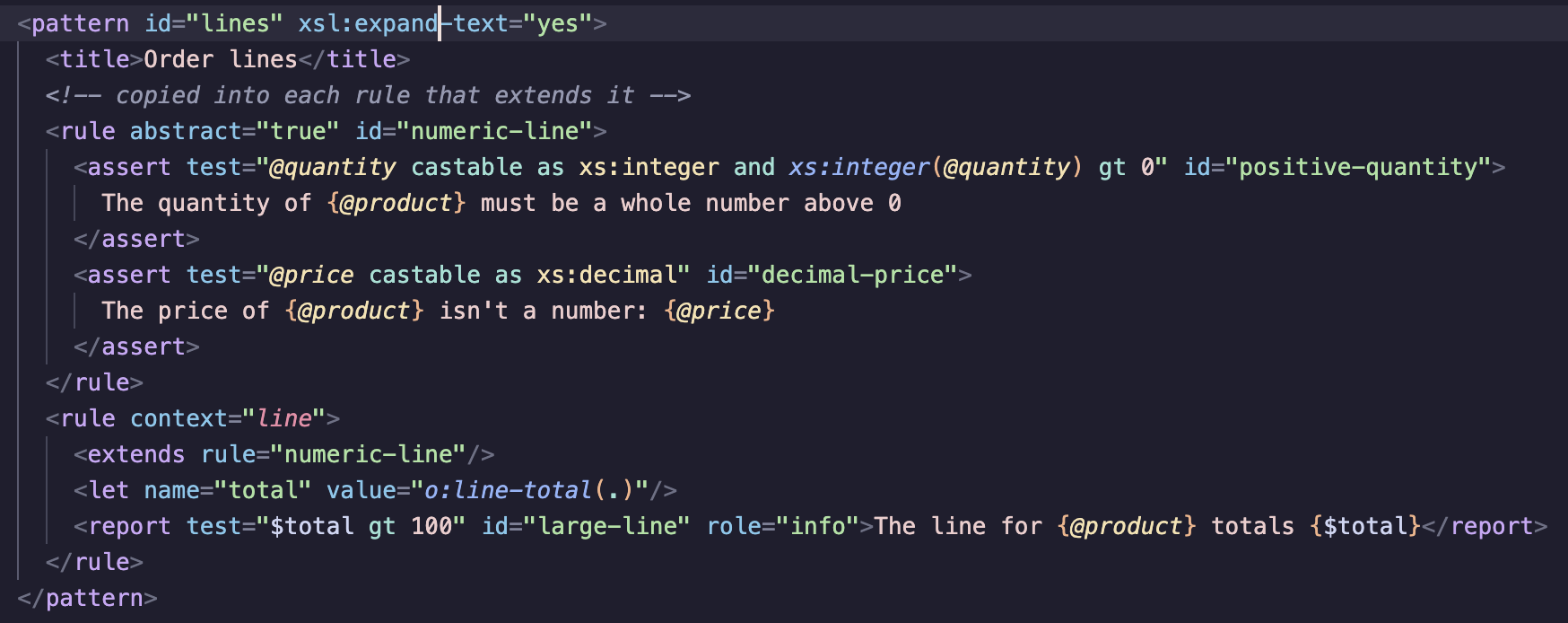
A message can use text value templates instead of sch:value-of, as in XSLT: with
xsl:expand-text="yes", Order {@id} has an invalid date: {@date} is
Order <value-of select="@id"/> has an invalid date: <value-of select="@date"/>.
It's a non-standard extension - ISO Schematron doesn't have it - so it's allowed only with the
XSLT.schematron.allowExpandText setting, which is off by default. For a Schematron file,
the status bar shows tvt:on or tvt:off for the setting; click it to open
the setting - it's for every Schematron file, not just the one in the editor.
- Where -
xsl:expand-textis inherited, as in XSLT: on the schema, it's for every message; on a pattern, rule or assertion, for those within it - and"no"turns it off within. Thexslprefix is the one the schema declares for XSLT - Messages - the text of
sch:assert,sch:report,sch:diagnosticandsch:property, and ofsch:emph,sch:spanandsch:dirwithin them: wheresch:value-ofis allowed. A title orsch:pis text - Braces -
{{and}}are braces in the text. Within an expression, braces and quotes are the expression's - e.g.{map { 'a': 1 }?a}or{"it's {fine}"} - Included files - a file
sch:includebrings in has its ownxsl:expand-text: a file without it is unchanged, so a library's braces, e.g. in[A-Z]{2}, are still text - Abstract patterns - a parameter in a text value template is replaced, as in an
attribute, e.g.
{$attribute}
In the editor, text value templates are highlighted and checked as XPath, with auto-completion, and Go to
Definition, Find All References, Rename and hover for their variables.
Schematron: Validate, and the XSpec tests of a
schema, rewrite them as sch:value-of before SchXslt2 compiles the schema - with the space
between two of them, e.g. {@first} {@last}, kept. Without the setting,
xsl:expand-text is reported as ignored, with quick fixes to remove it or to open the
setting.
Other Schematron processors ignore xsl:expand-text, so the braces would be in their reports
as written. For them, Schematron: Export Standard Copy... writes a copy of the schema as
standard ISO Schematron: its text value templates as sch:value-of, with the files it includes
in it, and paths relative to the copy. The stylesheet it uses, expand-text.xsl - in the
extension's xslt-resources/schematron folder - can also be run on its own, e.g. before
another processor: java -jar saxon.jar -s:schema.sch -xsl:expand-text.xsl
-o:schema-standard.sch.
Using a schema in a pipeline
A build or CI pipeline should compile the schema itself, with the
SchXslt2 version the team has chosen, and keep the schema and the
XSLT modules it includes or imports (xsl:include, xsl:import) in the build, so that
the pipeline controls everything it runs. If the schema uses text value templates, which other processors don't
know, Schematron: Export Standard Copy... - see above - writes a copy of it as standard
Schematron to compile instead.