
JSON and JNodes
XPath 4.0 path expressions can navigate JSON - maps and arrays - as they do XML. The
jtree() function wraps a map or array in a tree of JNodes, with a JNode
for each map entry and array member, so a path such as $order/customer/name works on
JSON data, with predicates, the descendant and parent axes, and the other features of path
expressions.
When a JNode is declared with a record type, for example
jnode(*, order), the XSLT/XPath extension knows which fields each step can reach. It checks
each step, offers the field names as auto-completion suggestions, and shows each field's type and
documentation on hover.
JNodes need version="4.0" and Saxon-PE or Saxon-EE 13, run with syntax extensions
enabled (Quick Run enables these for a version="4.0" stylesheet). Saxon-HE 13 doesn't
support XPath 4.0 syntax. In an XSLT 3.0 stylesheet, the jnode(...) item type and the
get(...) node test are reported as needing XPath 4.0.
Navigating JSON with JNodes
A JNode tree is made with jtree(), from a map or array - for example the result of
json-doc() or parse-json():
<xsl:variable name="root" select="jtree(json-doc('order.schema.json'))"/>
<xsl:variable name="defs" as="jnode()*" select="$root/get('$defs')/*"/>
- Name steps select map entries by key, e.g.
$order/customer/name.*selects every entry of a map, or every member of an array, e.g.$order/lines/*. - get(...) is the node test for a key that isn't an NCName, such as
get('$ref')orget('first name'), or for an array member by position, such asget(1). The extension reportsget('a')used on its own, as a function call, as a call to an unknown function. - Axes work as they do for XML:
$schema//get('$ref')finds every$refat any depth, and$line/../../currencygoes up from an order line, through thelinesarray, to the order. - jkey() gives a JNode's key - the map key, or the position of an array
member - and jvalue() gives the value it wraps. Where a value is atomized, such as
in an arithmetic expression or a text value template, a JNode gives its value, so
$line/quantity * $line/unit-priceworks withoutjvalue(). - A JNode is matched with the
jnode()item type, e.g.$tree/type instance of jnode(type).jnode()is offered in auto-completion forasattributes in XSLT 4.0.
JNodes with a record type
A variable, parameter or function result declared as jnode(*, T), where
T is a record type, is a JNode whose value is a T. A named item type can be used
too, e.g. <xsl:item-type name="order-node" as="jnode(*, order)"/>. Child steps
from the JNode are then auto-completed and checked against the record's fields, at any depth:
<xsl:variable name="order-value" as="order" select="json-doc($order-uri)"/>
<xsl:variable name="order" as="jnode(*, order)" select="jtree($order-value)"/>
...
<xsl:function name="ord:line-total" as="xs:double">
  <xsl:param name="line" as="jnode(*, line)"/>
  <xsl:sequence select="$line/quantity * $line/unit-price"/>
</xsl:function>
- Auto-completion - after a
/, the suggestions list the record's fields. Typing$order/customer/lists the fields of thecustomerrecord type. - Checks - a step that isn't a field is a warning, e.g. Child step 'nam' -
this is not a field of the record type: customer for
$order/customer/nam. A?lookup on the JNode, e.g.$order?id, is checked in the same way. - Hover - hovering over a field name in a step, such as
unit-pricein$line/unit-price, shows the field's type. Its@fieldtext is shown too, from thexsl:item-type's documentation note. Hovering over the type name injnode(*, order)shows the record type, with its fields and documentation.
Child steps after jtree($p)/, where $p has a record type, are
auto-completed and checked in the same way.
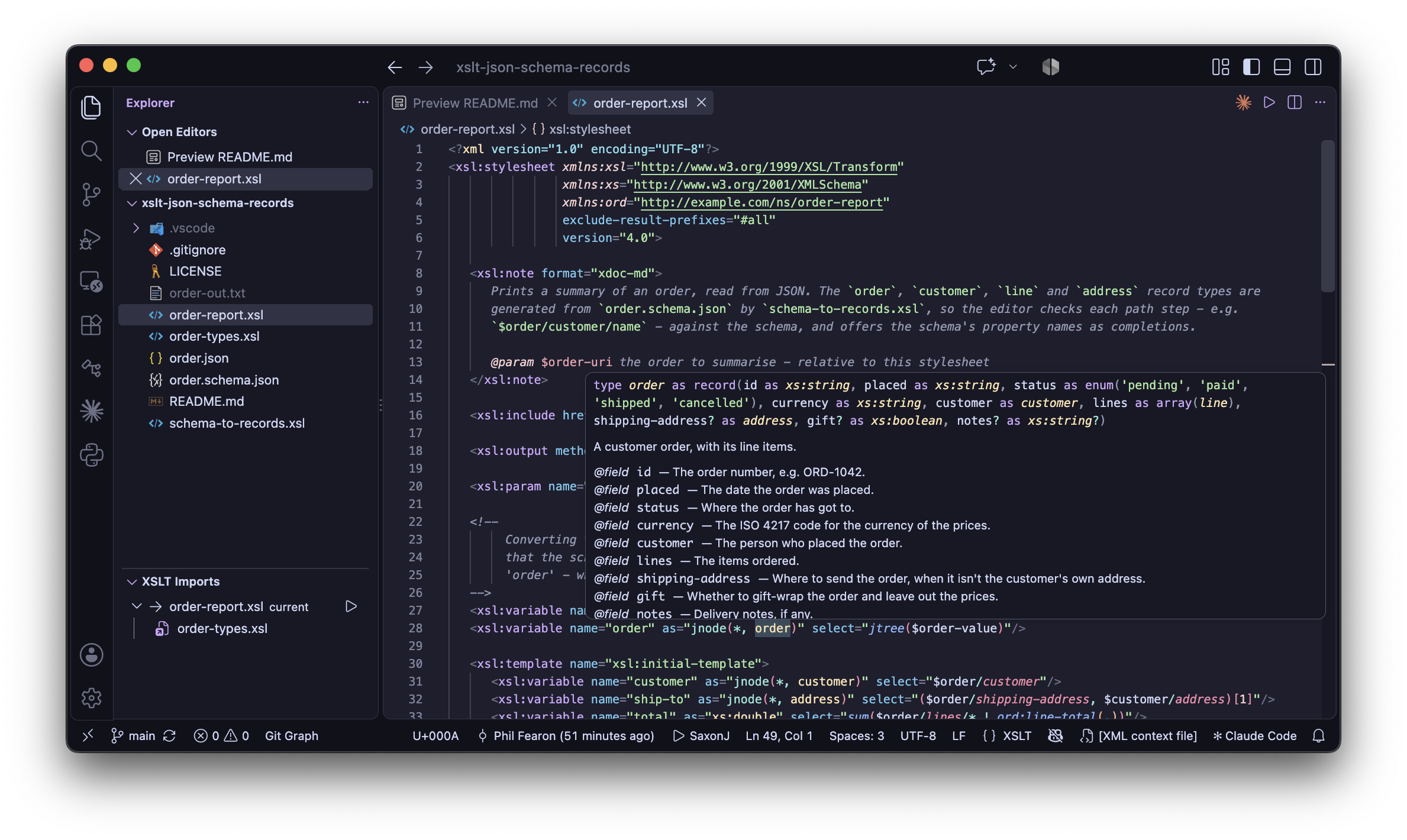
order in jnode(*, order)
shows the record type, imported from a module of types generated from a JSON Schema: its fields,
their types, and each field's description from the schema.Maps need jtree() before '/'
A / step needs a JNode on its left, not a map. Saxon 13 reports XPTY0019 for a step
such as $order-value/id, where $order-value is a map with a record type, so
the extension reports this as an error, with the suggested fix
jtree($order-value)/id. Alternatives are a lookup, $order-value?id, or a
variable declared as a jnode(*, order), as above. A step after a lookup, such as
$p?address/city, is reported in the same way.
Debugging: xdm:debug() shows JNode paths
The xdm:debug() function shows a JNode's location in its tree, as
an XPath path from the tree's root, above the value it wraps - in the same way it shows the location
of an XML node. For an order line, this is a path such as /lines/*[2], so you can see
which part of the JSON each value came from:
<xsl:message select="xdm:debug('ord:line', map {
  'line': $line,
  'sku': $line/sku,
  'bundle': $line/bundle-items
})"/>
The xsl:message output, for the second order line:
────────────────────────────── ord:line ──────────────────────────────
line:   /lines/*[2]
        {
          'sku': 'KIT-7',
          'description': 'Electronics starter kit',
          'quantity': 1,
          'unit-price': 64,
          'bundle-items': [
            {'sku': 'TL-1', 'description': 'Soldering iron', 'quantity': 1, 'unit-price': 0},
            {'sku': 'TL-2', 'description': 'Multimeter', 'quantity': 1, 'unit-price': 0}
          ]
        }
sku:    /lines/*[2]/sku
        'KIT-7'
bundle: /lines/*[2]/bundle-items
        [
          {'sku': 'TL-1', 'description': 'Soldering iron', 'quantity': 1, 'unit-price': 0},
          {'sku': 'TL-2', 'description': 'Multimeter', 'quantity': 1, 'unit-price': 0}
        ]
The xdm:debug variables auto-completion for xsl:message inserts a call
like this one, with every in-scope variable. See Debugging.
Things to know about JNodes and record types in Saxon 13
- A
jnode(*, T)type matches only an instance of T. A map with keys that T doesn't declare isn't an instance, sojtree(json-doc('order.json'))doesn't matchjnode(*, order)when the data has extra properties. Converting the value to the record type first - as for$order-valueabove - drops the extra keys, at every depth, and fails if a required field is missing or has the wrong type. - No recursive item types. An
xsl:item-typecan't refer to itself, directly or through other types (Saxon reports SXTA0001). A field that would refer back, such as a bundle of order lines within an order line, has to bemap(*)orarray(map(*))instead, so the steps after it aren't checked. - JSON numbers are
xs:double.json-doc()andparse-json()give every JSON number as anxs:double, so a record field for a number must bexs:double-xs:integerwould reject the data. A JSONnullis an empty sequence, so a nullable field needs an occurrence indicator, e.g.xs:string?. - No
??operator. Saxon 13 doesn't support the deep lookup operator, so use the descendant axis on JNodes instead, e.g.$schema//get('$ref').
Sample: JSON Schema to record types
The xslt-json-schema-records sample works in two stages:
schema-to-records.xslreads a JSON Schema,order.schema.json, as JNodes, and writesorder-types.xsl: anxsl:item-typefor the schema and for each of its$defs. Each property'sdescriptionbecomes an@fieldin the type's documentation note, so it's shown on hover.order-report.xslincludesorder-types.xsl, and prints a summary oforder.json, usingjnode(*, order),jnode(*, line)and other typed JNodes.
Run each stylesheet with Quick Run, choosing 'None' as the XML context
file, so it starts from xsl:initial-template. Then, in order-report.xsl,
try:
- typing
$order/customer/to see the customer's fields as suggestions - changing
$order/customer/nameto$order/customer/nam, to see the warning - hovering on
unit-pricein$line/unit-price, or onlineinjnode(*, line), to see the documentation taken from the schema - changing
$order/idto$order-value/id, to see thejtree()error and its fix - adding a property to
customerinorder.schema.json, runningschema-to-records.xslagain, and seeing it offered after$order/customer/
The sample's README describes how each JSON Schema keyword maps to an XPath type.